Encode Transform
Use Encode to turn categorical values into numerical features. Standard execution (Pandas) keeps each source column and adds encoded columns. Several methods produce a different schema in Big Data/AWS Glue execution (PySpark).
Basic Usage
To encode categorical columns:
- Select the Encode transform from the transform menu.
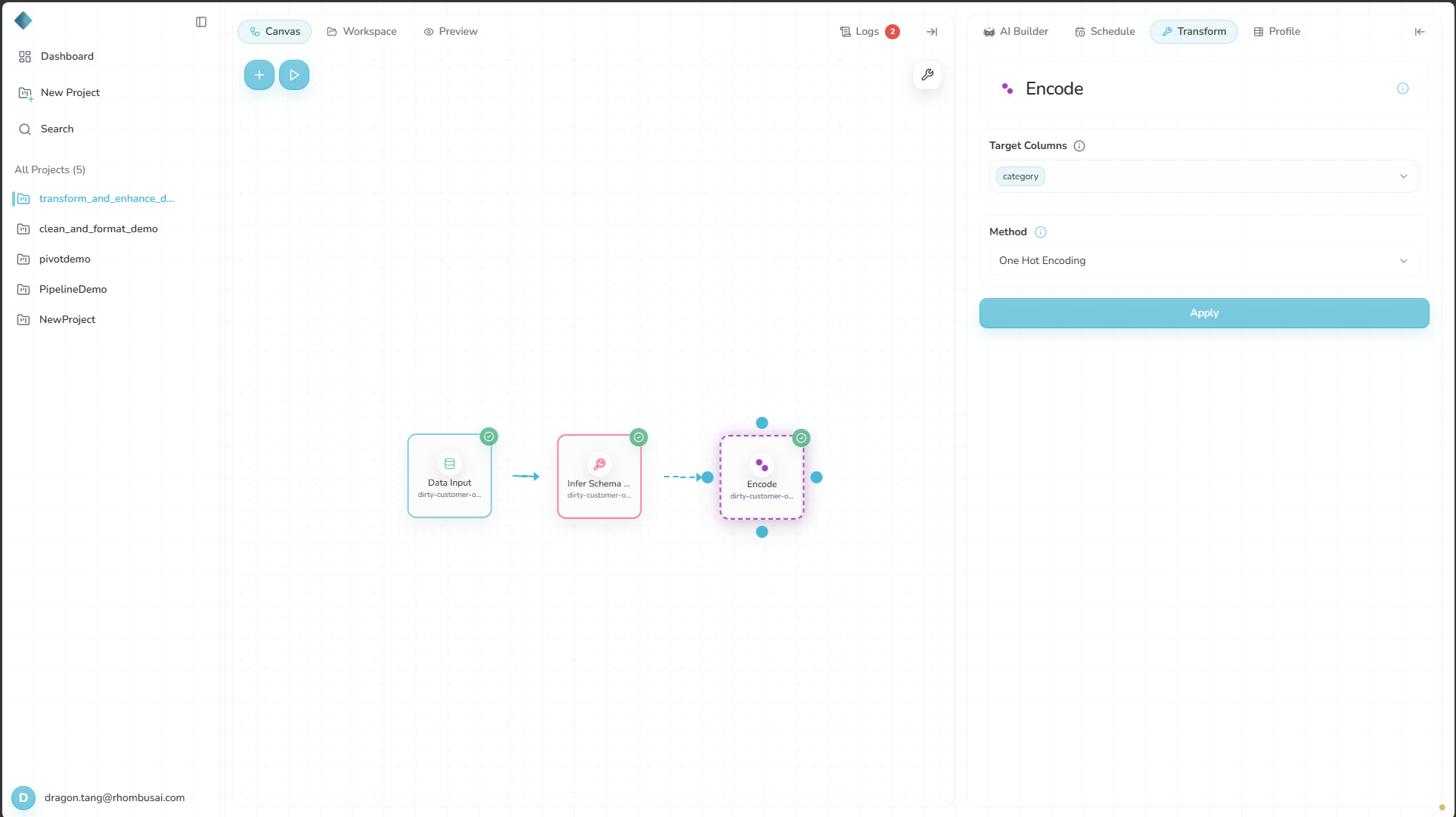
- Select one or more fields under Target Columns.
- Choose a Method.
- Apply the transformation.
Target Columns lists categorical columns only.
If no categorical columns appear
If Target Columns says that no categorical columns were found, none of the columns in the current input schema are identified as categorical.
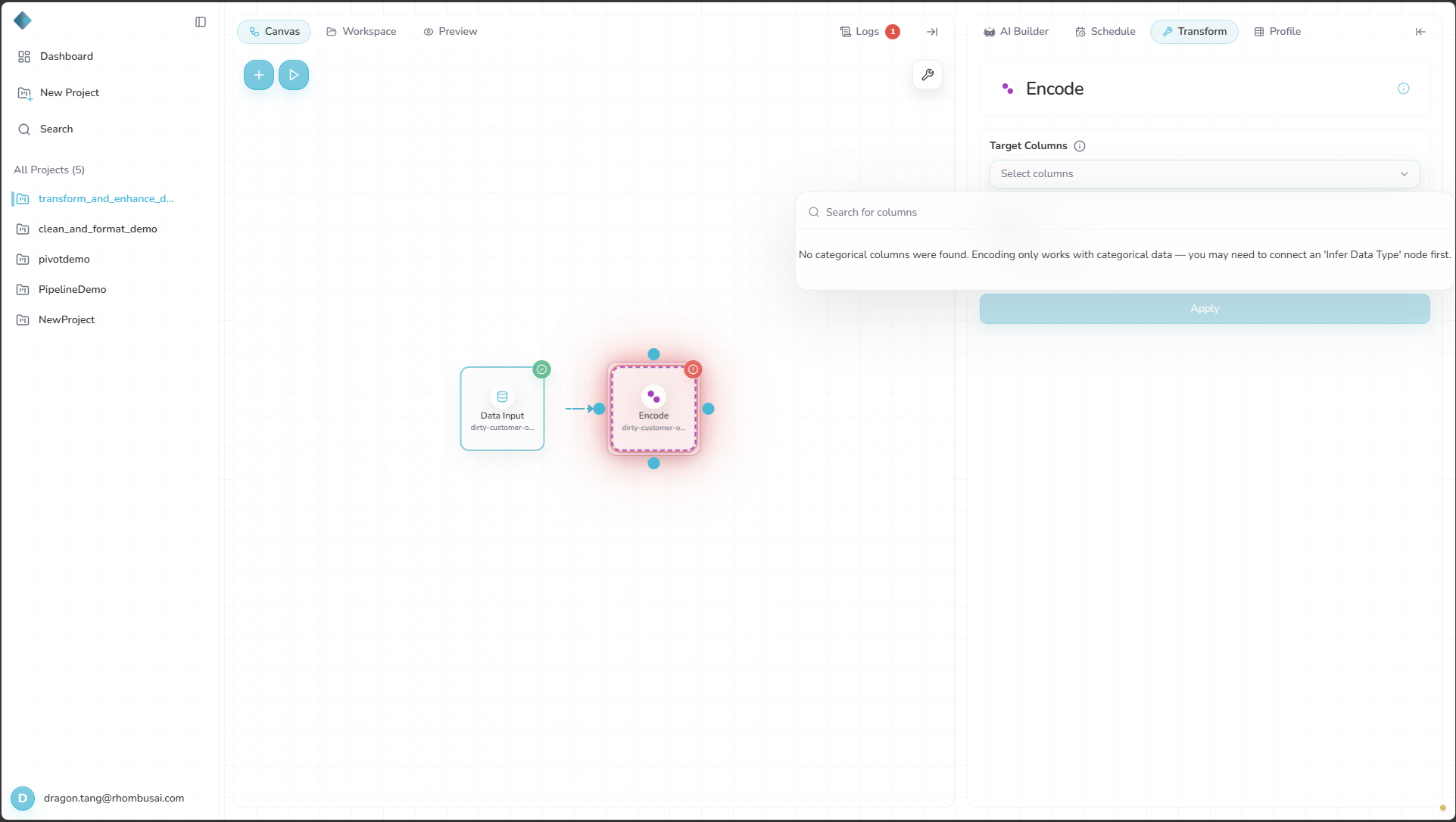
Add Infer Schema Type between the data source and Encode, then run or preview that upstream node. Reopen Encode to select the columns it identified as categorical under Target Columns.
Configuration Options
Basic Options
- Target Columns: Select one or more categorical columns to encode.
- Method: Choose one of these encodings:
- One-Hot Encoding
- Label Encoding
- Ordinal Encoding
- Binary Encoding
- Frequency Encoding
- Hashing Encoding
Select the information icon beside Method to open the encoding method guide.
Standard Execution Output
In Standard execution, encoded columns are added alongside their source columns.
| Method | Columns appended for each selected source column |
|---|---|
| One-Hot | One {source}_{category} column per observed non-null category |
| Label | One {source}_label column |
| Ordinal | One {source}_ordinal column |
| Binary | A data-dependent number of bit columns, normally named {source}_0, {source}_1, and so on |
| Frequency | One {source}_frequency column containing raw occurrence counts |
| Hashing | Eight columns named {source}_hash_0 through {source}_hash_7 |
The Encode panel cannot remove source columns, set the order of ordinal categories, or change the Standard hashing width.
Encoding Methods
One-Hot Encoding
Keeps the source column and adds one binary indicator for each observed category.
Use for: Unordered values such as red, blue, and green.
Label Encoding
Keeps the source column and assigns each category a unique integer. These codes may imply an order that does not exist.
Use for: Binary values or columns with many categories when the implied ordering is acceptable.
Ordinal Encoding
Keeps the source column and adds an integer-ranked column. Standard execution respects an existing ordered pandas categorical type. Otherwise, it infers an order that may not match the intended meaning.
Use for: Values with a defined order, such as shirt sizes.
The Encode panel does not let you set category order. Do not assume S, M, L, and XL will receive that order unless it is already stored in the input column's categorical metadata.
Binary Encoding
Keeps the source column and adds binary-code bit columns. This usually creates fewer columns than one-hot encoding.
Use for: Columns with many categories where one-hot encoding would be too wide.
Frequency Encoding
Keeps the source column and adds each category's raw occurrence count.
Use for: Distinguishing rare and common values when frequency is meaningful.
Hashing Encoding
Maps categories through a hash function. Standard execution keeps the source and adds eight hash columns for each selected field.
Use for: High-cardinality fields where a fixed output width is useful.
The current Encode panel does not provide a hash-width control.
Execution Mode Differences
| Method | Standard execution (Pandas) | Big Data/AWS Glue execution (PySpark) |
|---|---|---|
| One-Hot | Retains the source and appends one scalar column per category. | Replaces each selected source with one {source}_encoded vector column. |
| Label | Retains the source and appends {source}_label. | Replaces each selected source with {source}_indexed. |
| Ordinal | Retains the source and appends {source}_ordinal; respects an existing ordered categorical dtype. | Uses the same string-indexing behavior as Label and replaces the source with {source}_indexed. |
| Binary | Retains the source and appends bit columns. | Not supported. |
| Frequency | Retains the source and appends {source}_frequency. | Replaces each selected source with {source}_freq. |
| Hashing | Retains each source and appends eight scalar hash columns per source. | Replaces the selected sources with one combined hashed_features vector, using 262,144 features by default. |
The same configuration can produce different column names, column counts, and data types when you switch between Standard and Big Data/AWS Glue.
Examples
This example uses Standard execution.
Example: Encoding Product Categories
Input Dataset:
| Product ID | Category | Price |
|---|---|---|
| 1 | Electronics | 500 |
| 2 | Clothing | 50 |
| 3 | Electronics | 750 |
| 4 | Home | 200 |
| 5 | Clothing | 75 |
Configuration:
- Target Columns:
Category - Method: One-Hot Encoding
Result:
| Product ID | Category | Price | Category_Clothing | Category_Electronics | Category_Home |
|---|---|---|---|---|---|
| 1 | Electronics | 500 | 0 | 1 | 0 |
| 2 | Clothing | 50 | 1 | 0 | 0 |
| 3 | Electronics | 750 | 0 | 1 | 0 |
| 4 | Home | 200 | 0 | 0 | 1 |
| 5 | Clothing | 75 | 1 | 0 | 0 |
Best Practices
- Choose a method based on whether the categories are ordered and how many unique values they contain.
- Use Binary or Hashing Encoding if One-Hot would create too many columns.
- Use Ordinal Encoding for a semantic rank only when the input already has the correct ordered categorical metadata.
- In Standard execution, add Drop Columns later if downstream nodes should receive only the encoded fields.
- Keep the encoding scheme consistent between training and test data.
Troubleshooting
- A field is missing: If it does not appear under Target Columns, check that it is identified as categorical.
- Ordinal Encoding produces an unexpected rank: Check whether the input column has ordered categorical metadata. You cannot change the order in the Encode panel.
- Hashing Encoding produces an unsuitable output shape: Standard execution always creates eight columns per selected source in the current UI. Choose another method if needed.