Impute Transform
The Impute transform fills missing values in selected numerical columns.
Basic Usage
To fill missing values:
- Select the Impute transform from the transform menu.
- Select at least one numerical column under Target Columns.
- Leave Smart Imputation on to choose suitable methods automatically. Turn it off to choose a method yourself.
- Configure any settings shown for the manual method.
- Apply the transformation.
Impute currently supports only numerical targets. Target Columns therefore lists only numerical columns in both Smart and manual modes.

Configuration Options
Target Columns
Select one or more numerical columns. The same selection is used in Smart and manual modes.
Smart Imputation
Smart Imputation is on by default. It chooses strategies based on the target distributions, time-series characteristics, and relationships with other numerical columns.
Smart Imputation is a mode controlled by the toggle, not an item in the manual Imputation Method list.
Manual Imputation
Turn off Smart Imputation to use one method for every target column:
- Mean
- Median
- Mode
- Constant
- Backward Fill
- Forward Fill
- Linear Interpolation
- KNN
- Linear Regression
- Decision Tree
- Random Forest
- MICE (Multiple Imputation by Chained Equations)
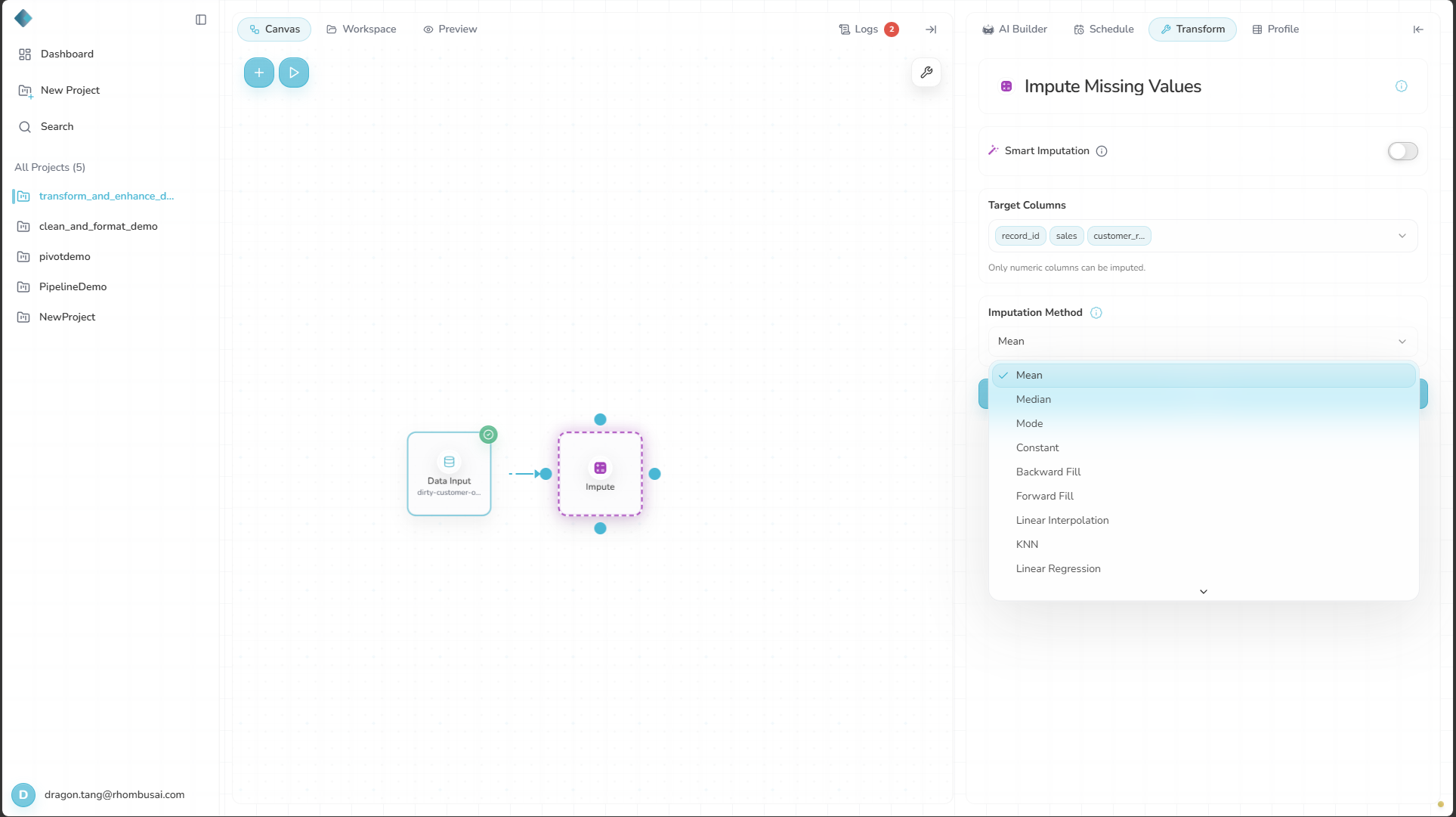
Select the information icon beside Imputation Method to open the method guide.
Advanced Options
These methods have additional settings:
Constant
- Replacement Value: Value used for missing cells.
KNN
- Neighbors Count: Number of neighbors used.
- Weights: Weight function used to make the prediction.
Random Forest
- Estimators Count: Number of trees.
- Maximum Features: Features considered when choosing each best split.
- Minimum Samples Leaf: Minimum samples in a leaf.
- Minimum Samples Split: Minimum samples required to split a node.
- Random State: Seed controlling randomness.
Requirements and Limits
- Select at least one numerical target column.
- All-null columns cannot be inferred, so the transform skips them. If every selected numerical column is all null, it returns the input unchanged with a warning.
- Manual KNN, Decision Tree, and Random Forest reject inputs above
10,000rows or20,000total cells. The check covers the entire input, including unselected and non-numerical columns. An exact boundary is allowed if the other limit is not exceeded.
Imputation Methods
Mean
Fills missing values with the mean of the column.
Use for: Roughly normal numerical data without extreme outliers.
Median
Fills missing values with the column median.
Use for: Skewed numerical data or data with outliers.
Mode
Fills missing values with the column's most frequent value.
Use for: Repetitive numerical values where the mode is representative.
Constant
Fills missing values with one configured value.
Use for: A known placeholder or domain default.
Backward Fill / Forward Fill
Uses the next or previous valid value in the column.
Use for: Ordered or time-series data where adjacent values are meaningful.
Linear Interpolation
Interpolates linearly between known values.
Use for: Ordered numerical data with an approximately linear trend between known points.
KNN
Finds similar rows with K-Nearest Neighbors and uses them to fill missing values.
Use for: Numerical data with meaningful clusters or local similarity.
Linear Regression
Predicts missing values from linear relationships with other variables.
Use for: Data with useful linear correlations.
Decision Tree / Random Forest
Uses decision-tree or random-forest regression to estimate missing values.
Use for: Numerical data with non-linear relationships.
MICE
Uses Multiple Imputation by Chained Equations across related variables to estimate missing values.
Use for: Complex missingness where variables depend on one another.
Examples
Example: Imputing Missing Values in Sales Data
Input Dataset:
| Date | Product | Sales | Customer_Rating |
|---|---|---|---|
| 2023-01-01 | A | 100 | 4.5 |
| 2023-01-02 | B | nan | 3.8 |
| 2023-01-03 | A | 150 | nan |
| 2023-01-04 | C | 80 | 4.2 |
| 2023-01-05 | B | 120 | 4.0 |
Configuration:
- Smart Imputation: Off
- Target Columns:
Sales,Customer_Rating - Imputation Method: Mean
Result:
| Date | Product | Sales | Customer_Rating |
|---|---|---|---|
| 2023-01-01 | A | 100 | 4.5 |
| 2023-01-02 | B | 112.5 | 3.8 |
| 2023-01-03 | A | 150 | 4.125 |
| 2023-01-04 | C | 80 | 4.2 |
| 2023-01-05 | B | 120 | 4.0 |
Best Practices
- Match the method to the data distribution and row order.
- Use domain knowledge when choosing constants and other assumptions.
- Record the method because imputation can introduce bias.
- Review imputed values against known ranges and distributions.
Troubleshooting
- The results look unrealistic: Check whether outliers skewed the imputation.
- KNN or regression gives poor results: Make sure there are enough complete rows to learn from.
- Imputation is slow: MICE and other complex methods can take longer on large inputs.
- Manual KNN, Decision Tree, or Random Forest reports that the dataset is too large: Choose another manual method or reduce the input below the documented limits.